Set up Ruam on your Mac or Windows PC
Install the app once and it counts your work in every app.

Download Ruam, install it, and sign in. Then Ruam counts your work from the menu bar or tray.
Before you start
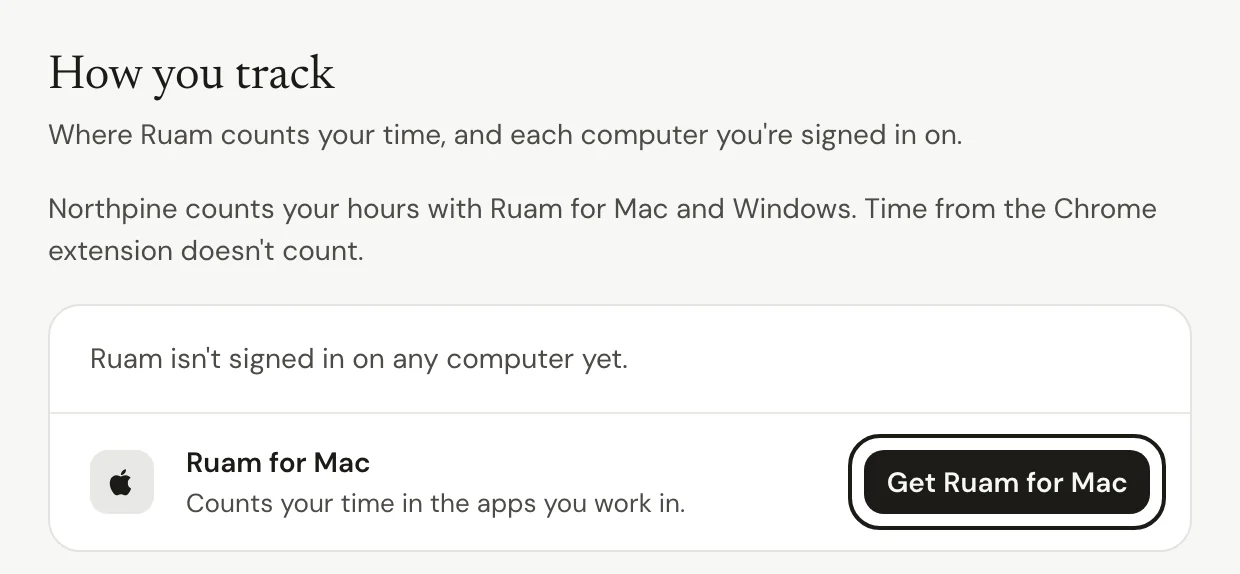
On a team, only one app counts your hours, so your time is never counted twice. The top of Settings > How you track says which app your team uses.
- If your team counts with Ruam for Mac and Windows, follow the steps below.
- If your team counts with the Chrome extension, time from this app doesn't count. Add Ruam to Chrome instead, or ask whoever runs your team before you switch.
On Free and Solo, you choose. Every app you connect counts, and time two apps both see is counted once.
Set up the app
Step 1: Download Ruam
- Go to Settings > How you track.
- Click Get Ruam for Mac or Get Ruam for Windows. The page offers the one for the computer you're on.
On Free and Solo, start from Overview instead. Under How should Ruam count your time?, pick Ruam for Mac or Ruam for Windows and click the button under it.
Step 2: Install it
On a Mac: open Ruam.dmg from your Downloads, drag Ruam onto the Applications folder, then open Ruam from Applications.
On Windows: the Microsoft Store opens. Click Get, then open Ruam.
Step 3: Sign in
- In Ruam, click Sign in. Your browser opens.
- Sign in with the same account you use for Ruam.
- Read what the app records, then click Connect the app.

Common questions
Q: I don't see Get Ruam for Mac. Why?
Your team counts with the Chrome extension. To use the app instead, click Ask to use Ruam for Mac instead (or Windows) on the same page, and your manager and your team's owner and admins see the request in Updates. Owners and admins see Or use Ruam for Mac there instead.
Q: I'm on a Chromebook, a Linux computer or my phone. What do I do?
Ruam for Mac and Windows don't run there. Use the Chrome extension instead. If your team counts with Ruam for Mac and Windows, click Ask to use the Chrome extension on Settings > How you track. On a phone, click Email me the links and open them on your computer.
Q: Can I use the app and the Chrome extension together?
On a team, only one of them counts your hours, so your time is never counted twice. Ask whoever runs your team before you switch. On Free and Solo, yes: both count, and time they both see is counted once. You can add the extension anytime.
Q: Does Ruam see what's on my screen?
No. It notes the names of the apps you work in, never file names or anything on your screen. When the app in front is a browser, it notes the site name and page title, and private windows aren't recorded unless you turn that on. To keep an app out entirely, add it under My excluded apps (desktop) in Settings > My privacy. See What can my team see?
Q: The sidebar doesn't say Counting. What should I check?
Make sure Ruam is open in your menu bar or tray. Then check Settings > How you track. If it says Signed out, open Ruam and sign in again.
What's next?
Need help? Go to Settings > Help and support and press Open chat, or email us at support@ruam.ai.