Daily recap
Close out your day in under a minute, and what your team sees of it.

After your work day, Ruam offers a short recap. Tap through a few questions about what moved and what's next. It's never required.
Before you start
- When it's offered: after your shift ends. Without a shift, when you stop for the day, or the next morning on Overview as Recap yesterday.
- Not required: skip it, or hide it with Not now in My Logbook (Not today on Overview). Closing it halfway keeps your answers for later.
- How far back: today or yesterday.
What your team sees
On Starter, Team and Business:
- Shared with your manager and the team's owner and admins: what moved today, with any lines and note you add to it, and your plan for tomorrow, with the day's hours and projects. On Team and Business, they see the plan as Up next in Reports.
- Only you: what's waiting or in your way, and what you owe someone; today's extra question; your one line on a quiet day; a note you type beside a Ruam AI draft; your mood and energy; and everything on your Still open list.
- Your mood and energy only ever count in an anonymous team average of 5 or more people. Nobody sees yours.
The recap marks each part as shared or Only you while you answer. On Free and Solo, only you can read your recaps.
Recap your day
Step 1: Open it
- Click Recap your day in My Logbook or on My Time Clock. You can also click Recap my day in Ruam for Mac or Windows or in the extension.
Step 2: Answer the questions
- Tap or type what moved today. You can add a note to it. Your team sees this part.
- Add anything that's waiting or holding you up. Only you see this.
- Write your plan for tomorrow. Your team sees it.
- Pick how today felt and how much energy you had. Only you see this.
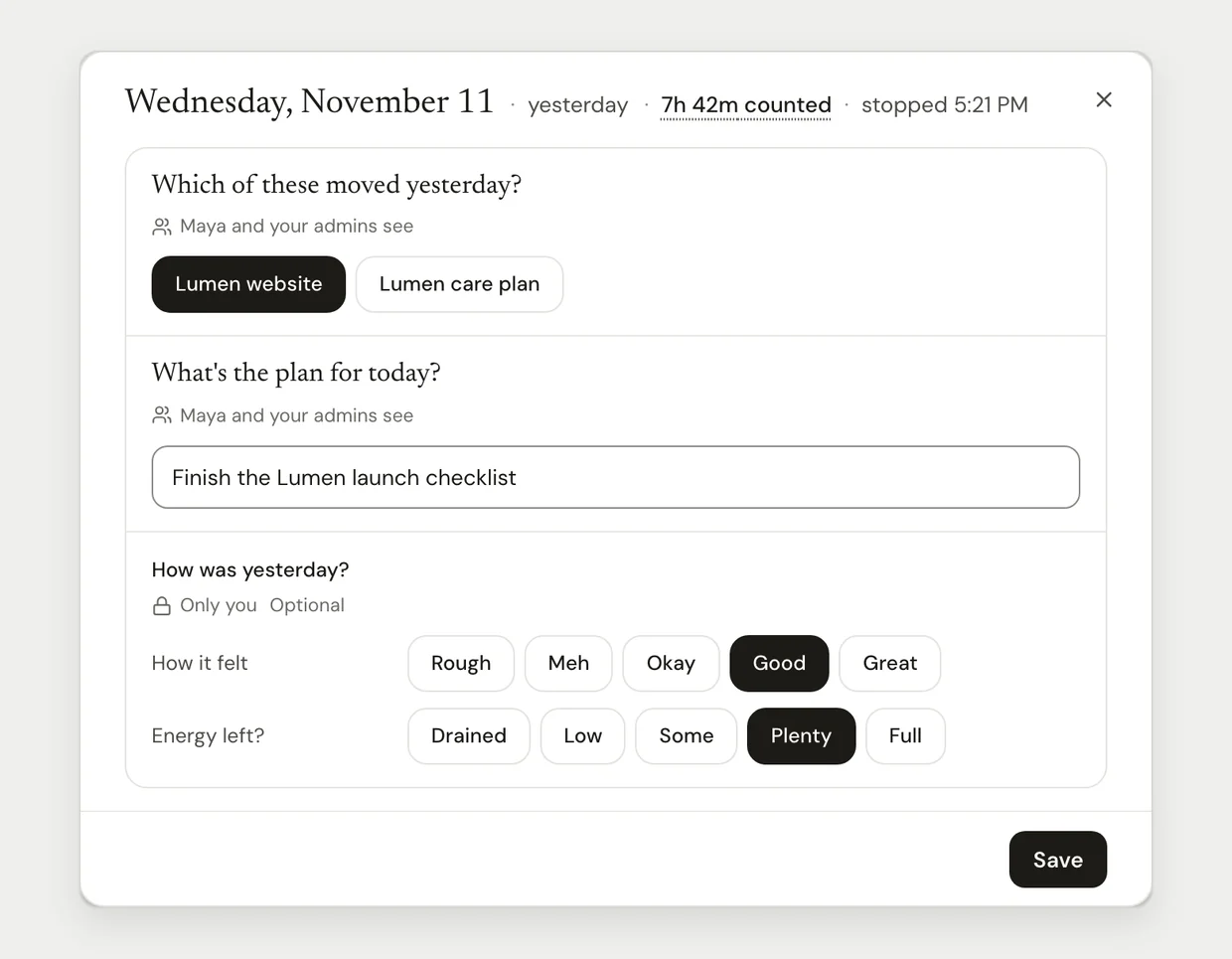
If you use Ruam AI, it can draft what moved today. Click Looks right to keep it, or Answer the questions instead. Once you click Looks right, the draft is shared like any answer. A draft uses 1 Ruam AI credit. Out of credits? You answer the questions as usual.
Step 3: See it later
- Your recap shows on the day in My Logbook.
- Next morning, Your plan for today on Overview shows what you planned.
Common questions
Q: Can I turn it off?
Yes. Go to Settings > Notifications and turn off Ask me to recap at the end of each work day.
Q: I missed yesterday's recap. Can I still do it?
Yes. Overview offers Recap yesterday the next morning. Older days can't be recapped.
Q: Can my manager see my mood?
No. Mood and energy only ever count in an anonymous team average of 5 or more people.
Q: What's Your week?
On the Week view of My Logbook, Your week gathers what moved, what's waiting and what's next from your recaps. Click Copy for my 1:1 to paste it anywhere.
Q: How do I choose the default for new people?
Owners and admins set Daily Recap for new people in Settings > Tracking. Each person can still turn their recap on or off.
What's next?
Need help? Go to Settings > Help and support and press Open chat, or email us at support@ruam.ai.